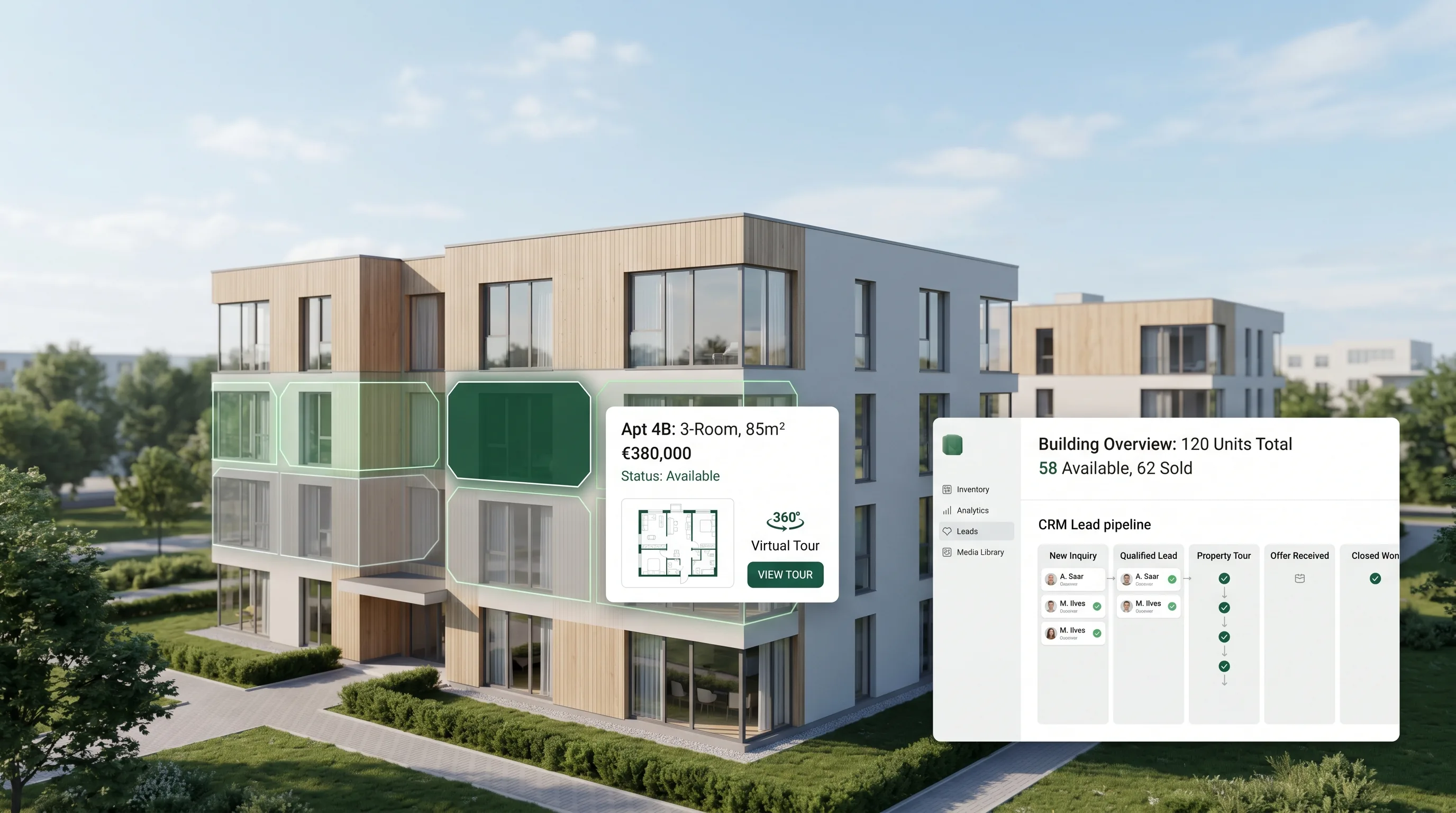
Clickable facade: live apartment availability on one render
A clickable facade turns one building render into an interactive selector with live availability, floor, m2 and floor plans for every apartment.
You're selling a new development in Estonia, and most of it sells on paper, long before the building exists. A buyer scrolls past a flat render and a PDF floor plan, and you have no idea whether that home is still free. A clickable facade fixes exactly this gap. It turns one building image into an interactive map where every apartment is a clickable shape with its own status, floor and plan. In this article you'll learn what a clickable facade is, what it shows, how it's built from renders you already own, and how it quietly turns a curious visitor into a lead.
Key Takeaways
- A clickable facade is a building image where each apartment is a clickable polygon showing live status (free, booked, sold), floor, m2, rooms and a floor plan.
- It's built from renders you already own, so existing visualisations become an always-on sales surface instead of files that sit dormant after delivery.
- Because most new homes in Estonia sell off-plan, a new build has to work harder to be understood before it physically exists.
- Every apartment click can open a per-unit page and a contact form, feeding leads straight into a pipeline.
What is a clickable facade with apartment availability?
A clickable facade is an interactive building image where each apartment is a clickable polygon showing live status (free, booked or sold), floor, room count, m2 and a floor plan. It sits on top of your existing render. One look tells a buyer what's still available and lets them open the exact home they want, without a phone call.
Think of it as a map laid over the visualisation. Where a normal render is one flat picture, a clickable facade with apartment availability is a layer of shapes, one per home. Each shape carries its own data and reacts to a tap. The Estonian term is klikitav fassaad; in Russian it's кликабельный фасад (klikabelnyy fasad). Same idea: the building image becomes the selector.
This pattern is now the established way to present inventory online. Interactive selectors turn a building view into a guided buyer journey with contextual contact capture. The clickable facade sits squarely in that category, but it's tied to your real renders rather than a generic template. Isn't that the whole point of paying for visualisations in the first place?
What does a clickable facade show on each apartment?
Each apartment polygon shows a tight, useful set of fields: availability status (free, booked, sold), the floor, the number of rooms, the area in m2, and the floor plan image. A contact button sits alongside. That's the whole picture a buyer needs to decide whether to look closer, and it's a deliberately short list.
The commercial terms stay off the facade by design. The clickable facade is a discovery and qualification surface, not a checkout. A buyer browses, finds a layout that fits, sees it's still free, and reaches out. The conversation that follows is where the human relationship begins, and that's where you want it. Surfacing every commercial detail up front would only collapse the reason to make contact.
So the field list stays focused:
- Status so nobody enquires about a sold home.
- Floor and orientation so a buyer can picture daily light.
- Rooms and m2 so they can match it to their family.
- Floor plan so the layout is legible at a glance.
- A contact button so interest turns into a message.
In our experience, this restraint actually raises enquiry quality. People who reach out have already self-qualified on layout, floor and area, so your first reply lands with someone who genuinely fits the home.
A clickable facade shows, per apartment, its live status (free, booked or sold), floor, room count, area in m2 and floor plan, plus a contact button. This focused field set lets a buyer self-qualify on layout and availability before enquiring, which is exactly the structure that keeps the sales conversation human.
Building a clickable facade from existing renders
A clickable facade is built directly on the renders you've already commissioned. A visualisation studio delivers a photoreal exterior image; that same image becomes the base layer of the facade. We draw a polygon over each apartment, attach its data, and connect the status to your live inventory. No reshoot, no new render budget, just a new use for assets you own.
This is the part developers often miss. A render studio hands over stills and a flythrough clip, and then those files go quiet. They appear once in a brochure or a portal listing and afterwards sit on a drive. A clickable facade gives them a second, permanent job. For the broader picture of who builds each piece and how it fits together, see our pillar guide to renders, 360 tours and the interactive apartment picker.
The build maps neatly onto assets you likely already have:
From exterior render to building orbit
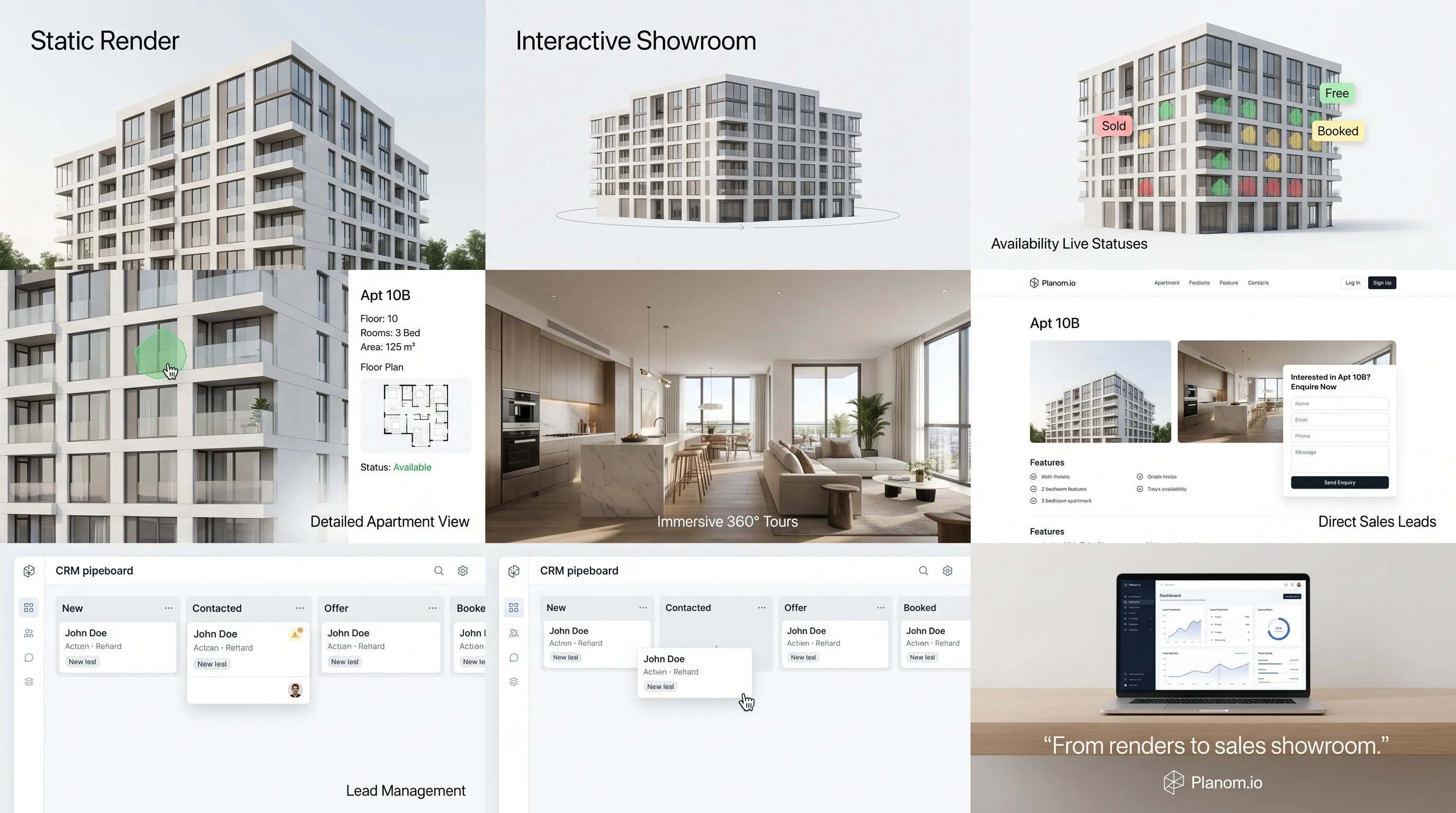
The exterior visualisations become an orbit of the building that a visitor can rotate. The clickable facade rides on top of those frames, so the apartment shapes stay aligned as the view turns. One render set powers both the look and the selector.
From interior renders to 360 panoramas
Interior visualisations become the basis for walkable 360 panoramas, one tour per apartment type. A buyer clicks a home on the facade, checks the plan, then steps inside virtually. We cover how that works for selling on paper in our guide to the 360 virtual tour for off-plan sales.
Why an interactive apartment selector matters for a new development in Estonia
Because most new homes in Estonia sell before they exist, the marketing surface is often all a buyer can see. A new build has to compete hard to be discovered and understood while it is still just renders and drawings.
Estonian buyers also search in three languages. The main listing portals run in Estonian, Russian and English, so your apartment content should read cleanly in all three. An interactive apartment selection for a new development carries that weight better than a static PDF, because the layout and status are visual first and language second.
There's a trust dimension too. Estonian trade press frames buying off drawings alone as the risk of a põrsas kotis, a pig in a poke. A clickable facade plus a 360 tour removes much of that fog. The buyer sees the home, the floor, the plan and that it's still free, all before a single message.
Want context on how demand is moving? In our experience, buyers spend longer comparing layouts and floors than they did a few years ago, so a surface that answers those questions visually earns the enquiry. A clickable facade with live availability lets them inspect a home properly before they ever reach out.
Because most new homes in Estonia sell off-plan, the developer's own interactive surface, a clickable facade with live availability, is frequently the only thing a buyer can actually inspect before the building exists.
How does the clickable facade turn a visitor into a lead?
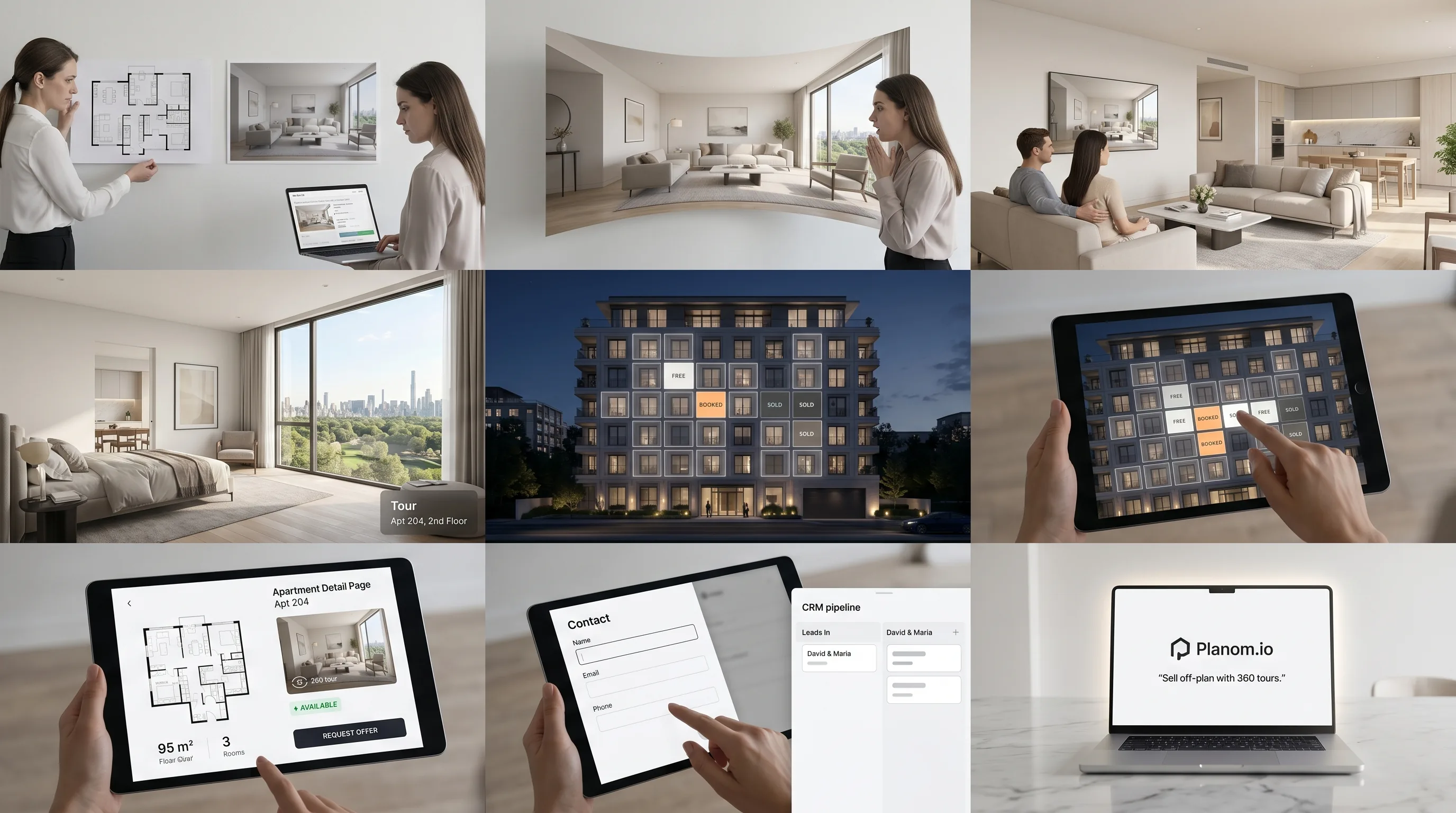
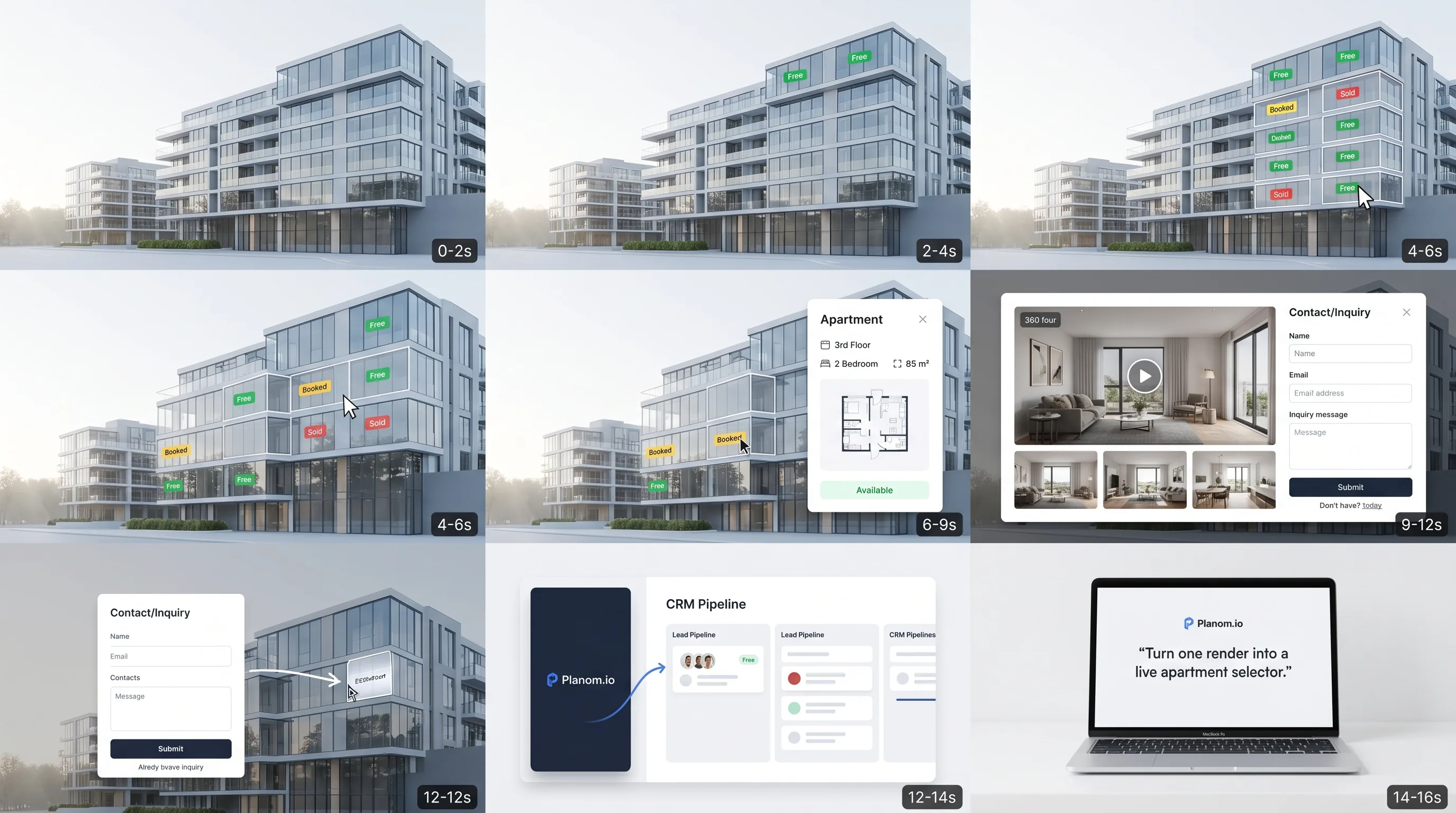
Every apartment click can open that home's own page, and every page carries a contact form. When a visitor sends a message, it lands as a lead in a pipeline, and your team gets an email notification the same moment. The selector isn't just a viewer; it's the front door of a sales system.
The flow is straightforward. A buyer browses the facade, opens a free apartment, walks the 360 tour, then fills the form. That message becomes a lead with a stage you can move through new, contacted, offer and booked. You can send a shareable offer page and watch sales analytics build over time, all in one place rather than across disconnected tools.
This is where the platform pulls ahead of a standalone selector. A generic unit-selector widget is often shallow on per-apartment pages and has no CRM behind it, so visualisation and lead handling live in separate systems. For the full end-to-end view, read about the digital sales showroom that connects renders, 360 tours and a CRM.
In our experience, the embeddable widget matters more than developers expect. You drop the interactive tour onto your own site, an apartment click opens that apartment's page, and the buyer relationship and the data stay with you, not with a third-party portal.
How does a clickable facade compare to a one-off render package?
A render package is a set of files: stills, a flythrough clip, sometimes a standalone tour, delivered once and then static. A clickable facade is a living surface that reuses those same files, adds live availability and a contact path, and stays online for the whole sales cycle. One is a deliverable; the other is a system.
The difference shows up in what happens after handover. Renders alone carry no status, capture no enquiries and go dormant. A clickable facade keeps working: it shows what's free today, opens indexable apartment pages that can surface in search, and routes interest into your pipeline. The assets you paid for earn their keep instead of gathering dust.
Isn't that the real waste with a normal render budget? You commission beautiful images, use them for one brochure, and let them go quiet. To see who builds each layer and how it slots together, our pillar guide to renders, 360 tours and the interactive apartment picker walks through the whole stack.
A one-off render package is files delivered once and then static, with no live status and no lead capture. A clickable facade reuses those same renders as an always-on selector with availability, indexable apartment pages and built-in CRM, so the visualisation keeps converting visitors long after the studio handover.
Frequently asked questions
What is a clickable facade?
A clickable facade is an interactive building image where each apartment is a clickable polygon. Each shape shows live status (free, booked or sold), floor, room count, m2 and a floor plan, plus a contact button. It's built on top of your existing exterior render, so buyers can browse and self-qualify before reaching out.
What information does the apartment selector show?
The apartment selector on the building facade shows availability status, floor, rooms, m2 and the floor plan for each home, with a contact button. The facade is a discovery and qualification surface, so a buyer self-qualifies on layout and availability, then starts the conversation directly with your team rather than at a checkout.
Can I build a clickable facade from renders I already have?
Yes. A clickable facade is built directly on your existing exterior render: we draw a polygon over each apartment, attach its data, and connect the status to your live inventory. Interior renders become 360 panoramas. There's no reshoot, so visualisations you already commissioned become an always-on interactive sales surface.
How is an interactive apartment selector different from a render?
A render is a static file delivered once. An interactive apartment selection for a new development is a living surface: it reuses the render, adds real-time availability per home, opens indexable apartment pages, and captures leads through a built-in CRM. The render shows the building; the selector sells the apartments.
Can I add a clickable facade to my own website?
Yes. The interactive tour, including the clickable facade, runs as an embeddable widget you drop onto your own site. An apartment click opens that home's page with its plan, specs, 360 hero and contact form. The buyer relationship and the lead data stay with you, not a third-party portal.
About the author: Marta Kask writes about real-estate marketing and off-plan sales for new developments in Estonia, with a focus on turning visualisations into working sales surfaces.
Building a new development and weighing how to present it online? Tell us about your project and we'll show you what a clickable facade built from your renders could look like.
See your project as a live map.
Send us your drawings. We render it - and make it sell.